 Tux
chrisclement.com/tbtc/3.htm THIS PAGE
Tux

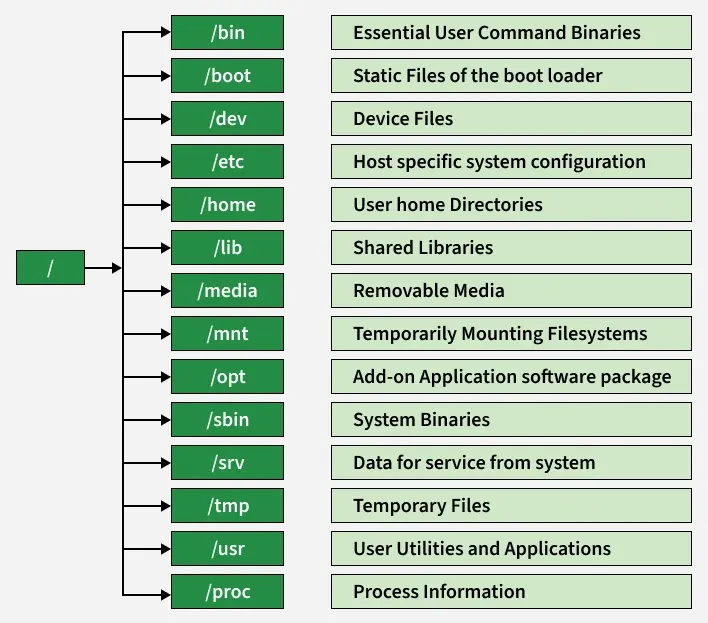
About A Linux distribution (or distro) is a complete Linux system package that includes the Linux kernel, a collection of software applications, and a package management system. These distributions are tailored to meet various computing needs, from general-purpose desktop systems to specialized environments for servers, multimedia production, or security testing.Linux directories follow a unified tree structure defined by the Filesystem Hierarchy Standard (FHS), starting at the root directory /, with key locations such as /bin for essential binaries, /etc for configuration files, /dev for device files, /usr for user applications, and /var for logs.
Terminal command line like DOS back in the day
for a beginner class in linux, i need 20 essential commands with examples -> Copilot 20 Essential Linux Commands 1. pwd Displays the current directory. Shell pwd Example output: Plain Text /home/chris/Documents 2. ls Lists files and folders. Shell ls Detailed list: Shell ls -l Show hidden files: Shell ls -la 3. cd Changes directories. Go to Documents: Shell cd Documents Go up one level: Shell cd .. Go to home directory: Shell cd ~ 4. mkdir Creates a new directory. Shell mkdir projects Create nested directories: Shell mkdir -p projects/linux/lab1 5. rmdir Removes an empty directory. Shell rmdir projects 6. touch Creates an empty file. Shell touch notes.txt Create multiple files: Shell touch file1.txt file2.txt 7. cp Copies files or directories. Copy a file: Shell cp notes.txt backup.txt Copy a directory: Shell cp -r projects projects_backup 8. mv Moves or renames files. Rename a file: Shell mv notes.txt notes_old.txt Move a file: Shell mv notes.txt Documents/ 9. rm Deletes files. Delete a file: Shell rm notes.txt Delete a directory and contents: Shell rm -r old_project 10. cat Displays file contents. Shell cat notes.txt Create a simple file: Shell cat > notes.txt Hello Linux Ctrl+D 11. less Views long files one page at a time. Shell less /etc/passwd Controls: Space = next page b = previous page q = quit 12. head Shows the beginning of a file. Shell head notes.txt First 5 lines: Shell head -5 notes.txt 13. tail Shows the end of a file. Shell tail notes.txt Watch a log file: Shell tail -f logfile.log 14. grep Searches for text in files. Shell grep "error" logfile.txt Case insensitive search: Shell grep -i "linux" notes.txt 15. find Searches for files and directories. Find a file: Shell find . -name "notes.txt" Find all text files: Shell find . -name "*.txt" 16. chmod Changes file permissions. Make a script executable: Shell chmod +x script.sh Example: Shell ./script.sh 17. whoami Displays the current username. Shell whoami Example output: Plain Text chris 18. df Shows disk space usage. Shell df -h Example output: Plain Text Filesystem Size Used Avail Use% /dev/sda1 50G 20G 28G 42% 19. ps Shows running processes. Shell ps Show all processes: Shell ps aux 20. man Displays the manual page for a command. Shell man ls Search within a man page: Plain Text /error Quit: Plain Text q Quick Practice Exercise Shell mkdir linuxlab cd linuxlab touch notes.txt echo "Hello Linux" > notes.txt cat notes.txt cp notes.txt backup.txt ls -l mv backup.txt oldnotes.txt grep "Linux" notes.txt pwd This sequence lets beginners practice creating directories, creating files, viewing contents, copying, renaming, searching, and navigating, all within a few minutes. Also good to know SUDO simon says, mother may i chmod777 anything goes 111 111 111
764 111 110 100
Python is the most used language in 2026. It is procedural and object oriented. What Object-Oriented Language Means An object-oriented language supports the object-oriented programming (OOP) paradigm, where programs are built using objects that interact with each other. These languages provide features such as: Classes and Objects: Classes act as blueprints; objects are instances created from them. Encapsulation: Bundling data and methods while restricting direct access. Abstraction: Hiding internal implementation details. Inheritance: Creating new classes based on existing ones. Polymorphism: Allowing methods to behave differently based on context (implied in OOP definitions). PYTHON polyfit.py
#define DHTPIN 2 // DHT22 data pin #define DHTTYPE DHT22 DHT dht(DHTPIN, DHTTYPE); void setup() { Serial.begin(9600); Serial.println("DHT22 Test"); dht.begin(); } void loop() { float humidity = dht.readHumidity(); float tempC = dht.readTemperature(); float tempF = dht.readTemperature(true); if (isnan(humidity) || isnan(tempC) || isnan(tempF)) { Serial.println("Failed to read from DHT22!"); delay(2000); return; } Serial.print("Humidity: "); Serial.print(humidity); Serial.print("% "); Serial.print("Temperature: "); Serial.print(tempC); Serial.print(" C "); Serial.print(tempF); Serial.println(" F"); delay(2000); // DHT22 updates about every 2 seconds Humidity: 58.00% Temperature: 23.00 C 73.40 F Humidity: 58.00% Temperature: 23.10 C 73.58 F